Promotions
Promotions are part of the discount that will be shown on GoFood. Usually, the discount would consist of SKU Promo, cart discount, and delivery discount.
- SKU Promotions are a discount promotion that is tied to a menu item. It can be set directly from the API (please check this section for detail).
- cart discount can be set by enabling it via gobiz app
- delivery discount can be set in gobiz app (please check this section for detail)
SKU Promotions
You should be able to set SKU Promotions from Gobiz API by hitting this endpoint POST /integrations/promo/outlets/{outlet_id}/v1/food-promos and deactivate it using PUT /integrations/promo/outlets/{outlet_id}/v1/food-promos/{promotion_id}/deactivate
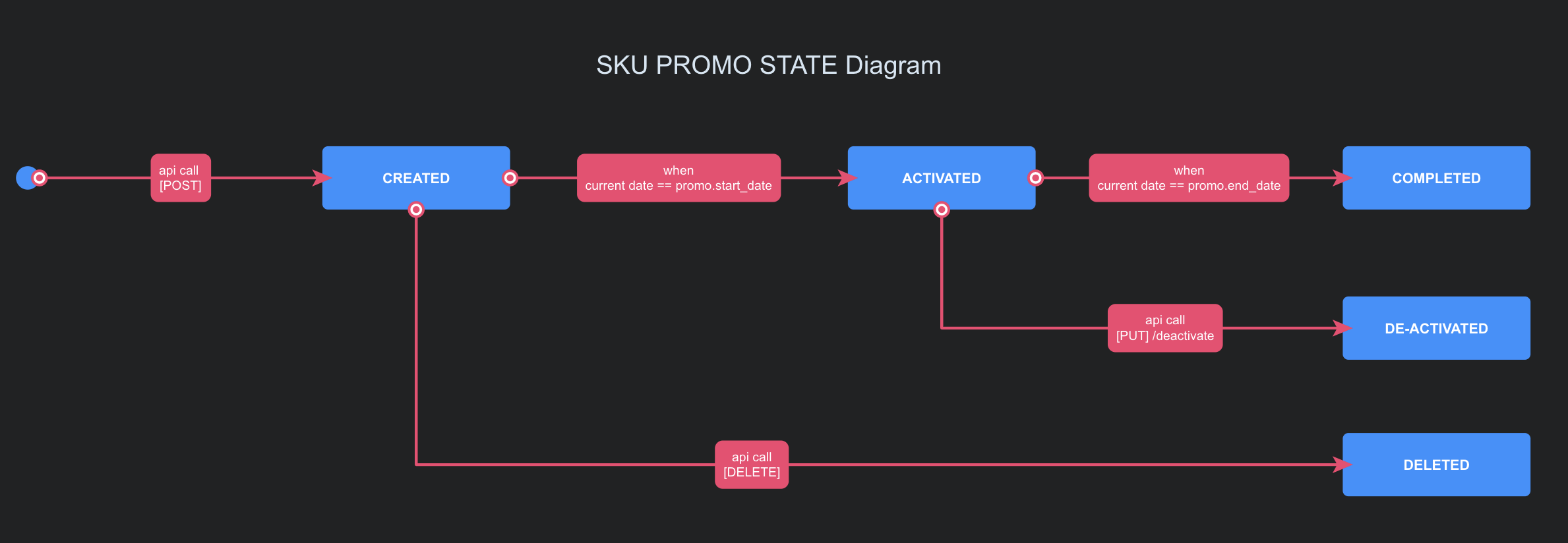
SKU Promo State Diagram
Additional Informations
- Difference between date based promotion and time based promotion are in the minimum discount percentage. For the day / date based on SKU promo, the minimum discount should be 5%, but for the time based SKU promo the minimum discount should be 30%
- Difference between deactivate promo and delete promo:
- Deactivate promo: for the promotion that is currently active
- Delete promo: for the promotion that is not yet active
- Currently in promo_type field only
sku_promothat is available - If we modify the menu item that is currently part of the promotion, it will be reflected in app directly
- It is not possible to modify a category that is currently part of the promotion. If you want to change category name, then you need to deactivate the promo first
- If we remove one item from a category that is registered in a current promotion, the promotion will be deactivated
- If we modify menu hour’s availability, nothing will happen. Promotion should still be active without any changes
- Different with delivery discount and cart discount, SKU promo are 100% charged to the merchant For detailed version of how to use the promo API, please refer to this guide
How to read promotion in the order notification
When there are order created and sent via order notification, if the order applied any promo discount, it will also be shown in the payload. Response example:
Example Promo under order notification:
{
  "header": {
    "version": 1,
    "timestamp": "2019-11-04T14:15:02.557+07:00",
    "event_name": "gofood.order.driver_otw_pickup",
    "event_id": "ca5c865a-0a36-3c39-9b88-348f97c1ff61"
  },
  "body": {
    "service_type": "gofood",
    "outlet": {
      "id": "M008272",
      "external_outlet_id": "1"
    },
    "customer": {
      "id": "F3109D097E3235C9100CE7D1FCD92C10",
      "name": "Jane Doe"
    },
    "order": {
      "status": "DRIVER_OTW_PICKUP",
      "pin": "8832",
      "order_total": 200000,
      "order_number": "F-175674194",
      "order_items": [
        {
          "quantity": 1,
          "price": 200000,
          "notes": "",
          "name": "Iced Coffee Jelly Float",
          "id": "fe6178cb-fdf5-4c42-bc95-ac6b32e576a8",
          "external_id": "123",
          "variants": [
            {
              "id": "7bbfaec2-a33d-4278-a200-ee6d9c862f6a",
              "name": "Less Sugar",
              "external_id": "variant-123"
            },
            {
              "id": "58bfb0db-8542-45a8-96c8-77cd7140b452",
              "name": "Less Ice",
              "external_id": "variant-345"
            }
          ]
        }
      ],
      "currency": "IDR",
      "takeaway_charges": 0.0,
      "created_at": "2019-11-04T14:15:00.277+07:00",
      "applied_promotions": [
        {
          "scope": "cart",
          "detail": {
            "redeemed_amount": 35000,
            "merchant_budget_share_percentage": 0
          }
        },
        {
          "scope": "delivery",
          "detail": {
            "redeemed_amount": 9000,
            "merchant_budget_share_percentage": 25
          }
        },
        {
          "scope": "sku",
          "detail": {
            "item": {
              "id": "65717e66-3792-4053-ae10-e34be0784dcb",
              "external_id": "MPR526277763"
            },
            "id": "019acaee-144d-483b-b1fa-c4fced5efc37"
          }
        }
      ],
      "cancellation_detail": {
        "reason": ""
      }
    },
    "driver": {
      "name": "John Doe"
    }
  }
}
As you can see that promo detail under the notifications are formatted like this:
"applied_promotions": [
        {
          "scope": "cart",
          "detail": {
            "redeemed_amount": 35000,
            "merchant_budget_share_percentage": 0
          }
        },
        {
          "scope": "delivery",
          "detail": {
            "redeemed_amount": 9000,
            "merchant_budget_share_percentage": 25
          }
        },
        {
          "scope": "sku",
          "detail": {
            "item": {
              "id": "65717e66-3792-4053-ae10-e34be0784dcb",
              "external_id": "MPR526277763"
            },
            "id": "019acaee-144d-483b-b1fa-c4fced5efc37"
          }
        }
      ]
How to read and calculate payload above
- Cart discount calculation
- Redeemed amount: Rp35.000
- Merchant budget share percentage: 25%
- It means that
- Charged to merchant : 25% * Rp35.000 Rupiah = Rp.8750
- Charged to gofood: Rp35.000 Rupiah - Rp8.750 Rupiah = Rp26.250 Rupiah
- Delivery discount calculation
- Redeemed amount: Rp9.000
- Merchant budget share percentage: 0%
- It means that
- Charged to merchant: 0% * Rp9.000= Rp.0
- Charged to gofood: Rp9.000 - Rp0 = Rp9.000
- SKU Promo won’t have any definitive number in the promotion. But you should be able to lookup the promo detail by hitting
GET /integrations/promo/outlets/{outlet_id}/v1/food-promos/{promotion_id}(please refer to this section) using the promotion id 019acaee-144d-483b-b1fa-c4fced5efc37