GoFood Order State
Background
As all events need to have subscribed on self serve basis, so all of the detail of order state needs to be clear so that there are no issue that is raised because of wrong subscription on the order notification or wrong handling regarding each order notification event
State of Gofood Order
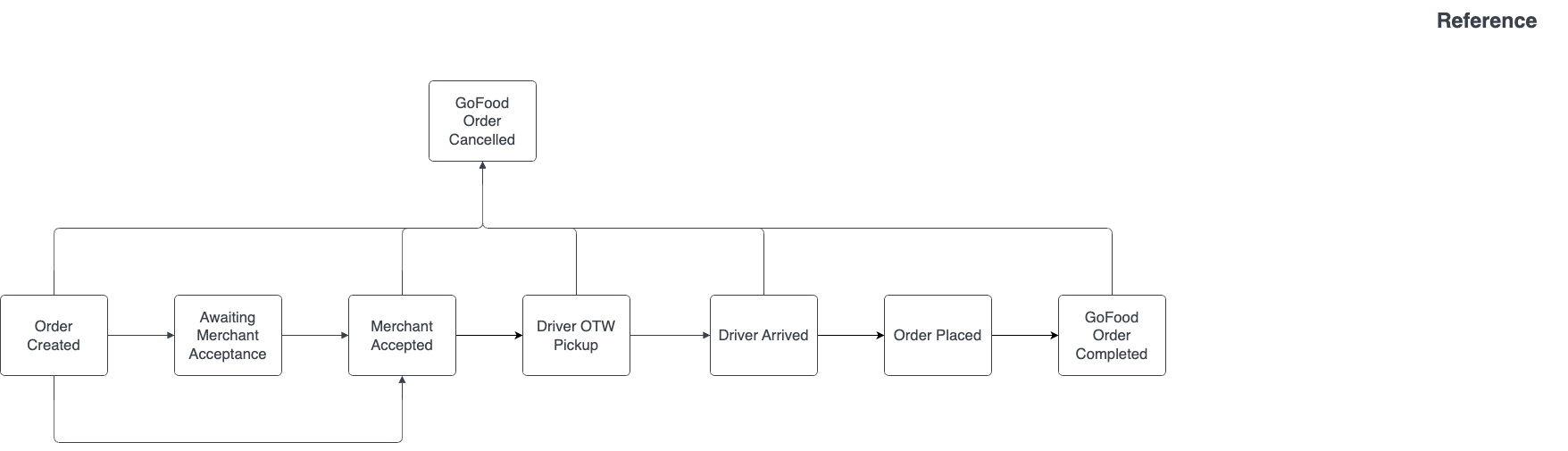
Information of each order states
- Order Created State where the user placed order to merchants
- Awaiting Merchant Acceptance
State where merchant are given options when they can reject the order or accept the order. There are 2 different time window when merchant’s are on this state
- 1 Minute if order acceptance are Auto Accept on Timeout, after 1 minute has passed without reaction then the order will be automatically accepted
- 3 Minute if order acceptance are Manual Acceptance, after 3 minutes has passed without reaction then the order will be automatically rejected
- If the merchant are on Auto Accept mode, then this state won’t be happening since after order created, the state will be automatically changed to Merchant Accepted
- Merchant Accepted
State where the merchant accepted the order
- Triggered when the merchants clicks accept button on both Auto Accept on Timeout and Manual Acceptance
- Will be automatically triggered if merchants are on Auto Accept mode
- Driver OTW Pickup
- Triggered when the driver is already picking up the order and on their way to the restaurant
- Driver Arrived
- Triggered when the driver arrived at the restaurant
- GoFood Order Completed
- Triggered when the driver already completed the order, and finished on delivering the food to user
- GoFood Order Cancelled
- Triggered when there are cancellation orders request from user
Order Simulation (Case 1 Order Success)
- User order food on 1.00 PM
- Order Accepted on 1.01 PM
- Driver OTW Pickup on 1.15 PM
- Driver Arrived at resto on 1.20 PM
- Order successfully delivered to user on 1.40 PM
Order Event Notification (Case 1 Order Success)
gofood.order.createdwill be sent on 1.00 PMgofood.order.merchant_acceptedwill be sent on 1.01 PMgofood.order.driver_otw_pickupwill be sent on 1.15 PMgofood.order.driver_arrivedwill be sent on 1.20 PMgofood.order.completedwill be sent on 1.40 PM
While the ORDER_CREATED event marks the initial order creation , the MERCHANT_ACCEPTED event is the critical operational trigger, as it signals the merchant to begin food preparation.
Order Simulation (Case 2 Order Cancelled)
- User order food on 1.00 PM
- Order Accepted on 1.01 PM
- Order Cancelled on 1.08 PM
Order Event Notification (Case 2 Order Cancelled)
gofood.order.merchant_acceptedwill be sent on 1.01 PMgofood.order.cancelledwill be sent on 1.08 PM
Scheduled Orders
GoFood offers two types of Scheduled Orders, both with different notification flows than immediate orders (specifically during created and merchant accepted states):
Regular Scheduled Order: Enabled by the customer via the "Scheduled Order" toggle on the checkout page in the GoFood Customer app.
GoFood Catering: Accessed via a a curated “GoFood Catering” entry/sub-menu on the GoFood homepage (available only for selected merchants). It allows customers to book multiple meals over several days in a single checkout (planned meals for a period).
Both scheduled order types use different notification flows than regular orders, specifically during the creation (gofood.order.created) and merchant accepted (gofood.order.merchant_accepted) states.
Regular Scheduled Order
gofood.order.created: The notification is sent immediately on the day the customer places the order (when they press the Order button).gofood.order.merchant_accepted: The notification is sent on the scheduled day, near pickup time (typically ~30 minutes before the selected delivery window, different for each merchant based on the GoFood model), as the preparation reminder.
GoFood Catering
gofood.order.created:- 1st SKU / menu: the notification is sent immediately on the order creation day (when the customer taps Order).
- 2nd SKU and onwards: The notification is sent H-24 (24 hours before) the selected delivery window for each SKU.
gofood.order.merchant_accepted: the notification is sent on the scheduled fulfillment day, near pickup time (typically ~30 minutes before the selected delivery window, different for each merchant based on the GoFood model), as the preparation reminder.
Order Simulation
Regular Scheduled Order
Order Simulation:
- Customer places an order for SKU A on 19 Feb 2026 at 14:00 WIB, scheduled for delivery on 20 Feb 2026 between 13:00–13:30 WIB (30-minute delivery window).
- Order will be accepted near the pickup time (typically ~30 minutes before the selected delivery window, based on the GoFood model). In this case, the order is accepted on 20 February 2025, 12:30 WIB.
- Then, order can proceed as usual.
Notification Flow:
- Webhook in event
gofood.order.createdwill be sent on 19 Feb 2026 at 14:00 WIB. - Webhook in event
gofood.order.merchant_acceptedwill be sent on 20 February 2025, 12:30 WIB. - All subsequent events (e.g., driver_otw_pickup/driver_arrived/order_placed/completed or cancelled), will be sent as usual following the standard order flow.
Scheduled Flag in Payload
"scheduled_flag":{
  "schedule_delivery_time_start":"2026-02-20T13:00:00+07:00",
  "schedule_delivery_time_end":"2026-02-20T13:30:00+07:00",
  "is_catering":false
  },
"created_at":"2026-02-19T14:00:00+07:00"
GoFood Catering Order
Order Simulation:
Customer places an order GoFood Catering on 24 Jan 2026 at 07:00 WIB for
- SKU A to be delivered on 24 Jan 2026 between 18:30–19:00 WIB
- SKU B to be delivered on 25 Jan 2026 between 18:30–19:00 WIB
- SKU C to be delivered on 26 Jan 2026 between 18:30–19:00 WIB
Notification Flow:
SKU A- Webhook in event
gofood.order.createdwill be sent on 24 Jan 2026 at 07:00 WIB (when the customer pushes the order button). - Webhook in event
gofood.order.merchant_acceptedwill be sent on 24 January 2025, 18:05 WIB (~ 30 Minutes before the selected delivery window). - All subsequent events (e.g., driver_otw_pickup/driver_arrived/order_placed/completed or cancelled), will be sent as usual following the standard order flow.
- Webhook in event
gofood.order.createdwill be sent on 24 Jan 2026 at 18:30 WIB (24 Hours before the selected delivery window). - Webhook in event
gofood.order.merchant_acceptedwill be sent on 25 January 2025, 18:05 WIB (~ 30 Minutes before the selected delivery window). - All subsequent events (e.g., driver_otw_pickup/driver_arrived/order_placed/completed or cancelled), will be sent as usual following the standard order flow.
- Webhook in event
gofood.order.createdwill be sent on 25 Jan 2026 at 18:30 WIB (24 Hours before the selected delivery window). - Webhook in event
gofood.order.merchant_acceptedwill be sent on 26 January 2025, 18:05 WIB (~ 30 Minutes before the selected delivery window). - All subsequent events (e.g., driver_otw_pickup/driver_arrived/order_placed/completed or cancelled), will be sent as usual following the standard order flow.
Scheduled Flag in Payload
SKU A"scheduled_flag":{
"schedule_delivery_time_start":"2026-01-24T18:30:00+07:00",
"schedule_delivery_time_end":"2026-01-24T19:00:00+07:00",
"is_catering":true
},
"created_at":"2026-01-24T07:00:00+07:00"
"scheduled_flag":{
  "schedule_delivery_time_start":"2026-01-25T18:30:00+07:00",
  "schedule_delivery_time_end":"2026-01-25T19:00:00+07:00",
  "is_catering":true
  },
"created_at":"2026-01-24T18:30:00+07:00"
"scheduled_flag":{
  "schedule_delivery_time_start":"2026-01-26T18:30:00+07:00",
  "schedule_delivery_time_end":"2026-01-26T19:00:00+07:00",
  "is_catering":true
  },
"created_at":"2026-01-25T18:30:00+07:00"
Identifying Payment Settlement
You can use gofood.order.placed event in order to identify whether the payment was successfully paid or not. As gofood.order.completed does not mean that the payment is always successful and gofood.order.cancelled does not mean that the payment is always unsuccessful.
Order Simulation (Order Canceled but Payment Successful)
- User order food on 1.00 PM
- Order Accepted on 1.01 PM
- Pin Exchanged by Driver on 1.10 PM
- Driver cannot found customer, hence the order is cancelled in 1.22 PM
Order Event Notification (Order Canceled but Payment Successful)
gofood.order.merchant_acceptedwill be sent on 1.01 PMgofood.order.placedwill be sent on 1.10 PMgofood.order.cancelledwill be sent on 1.22 PM
In this case, the order is canceled but the payment is successful and will be sent to merchant